
Using ZapFast
Writing
Undo and redo in the message field apply to its current chat and account. Switching chats or accounts, closing a chat, or unlinking clears the editor’s undo history. Saved drafts remain available when you return to their chat.
Enter sends and Shift+Enter adds a line. Turn off Enter sends in Settings
to make Enter add a line and send with Ctrl+Enter (Command+Enter on macOS).
*bold*, _italic_, ~strike~, and ```monospace ```` format
like WhatsApp, and a message of nothing but emoji shows large.
Paste text with Ctrl+V (Command+V on macOS) or Shift+Insert, as in other
Linux applications.
Mentions in a group are written with @. Choose all to mention
everyone when the group’s member list is available: the message shows @all,
highlighted like any other mention.
Portuguese also accepts @todos, and each other language accepts its own
word; the sent message still shows @all. In a group of more than 32
people, only admins can mention everyone. People are notified as they are
for any mention. Edits update the visible mentions. Editing an existing @all
mention does not notify everyone again; adding @all in an edit requests a new
notification. Forwarding or quoting an @all message does not notify everyone
again. A group where an unread message mentions you, or everyone, shows @
beside its unread count in the chat list, even when muted, and opening it shows
the oldest unread mention. The smiley opens emoji
(searchable), GIFs, and stickers,
including the stickers used on the phone.
Right-click a message to reply, react with any emoji, edit, forward, delete, or check when it was sent, delivered, and read. The reaction row has a + that opens the full emoji picker. Hover over a reaction to see who added it. When someone reacts to one of your messages, the chat moves to the top of the list. Editing uses the composer. Press Escape to cancel. If WhatsApp refuses an edit, the message keeps its earlier text.
Development builds also show when your message was delivered and read when you click its time or ticks, as on WhatsApp.
Forwarding opens a recipient picker. Select up to five writable chats, as on WhatsApp; a message labelled as forwarded many times goes to one chat at a time. With one chat selected, Forward sends it straight away. With several, Review recipients lists them for you to confirm, and Back returns to the picker without losing the selection. If a destination becomes locked or read-only, ZapFast returns to selection instead of sending a partial batch. Switching accounts discards the open forwarding selection. In a large window the dialog takes more of the window, so more recipients fit at once; it still stays inside a narrow or short one, and searching or changing the selection does not collapse the list.
Right-click a group message and choose Reply privately to open a direct conversation with its sender while quoting the group message. The quote survives closing the recipient chat or switching accounts. Locked or inaccessible source groups hide their quote previews and cannot be used for sending until authorized again. Deleting the recipient chat discards its private-reply recovery, including refusals arriving after deletion.
Double-click beside a message, or on its edge, to reply to it. A double-click on its text still selects the word.
Deleting a message asks which copies to remove. Delete for everyone revokes it through WhatsApp. In 0.19.0, Delete for me removes only this computer’s copy, and individual deletions do not sync to or from your phone.
Development builds now sync Delete for me with your phone and linked devices; other people keep their copy. This needs a connection, and the local copy disappears only after WhatsApp accepts the deletion. Phone deletions sync here too, and history replay cannot restore deleted messages. Interrupted requests remain saved for that account and retry when it reconnects, including when an acknowledgement was lost. Unlinking clears those requests. Confirmed deletions whose local cleanup failed are repaired on restart or reconnect without another network request. Neither deletion can be undone.
To delete several messages at once, select them (see Selecting messages) and choose Delete… in the bar under the chat, or right-click any selected message. Delete for everyone is offered only when every selected message can still be revoked. The confirmation shows how many messages it deletes, and each is deleted as it would be on its own.
Delete chat and Clear chat already sync in 0.19.0, as described under Chats.
Development builds place a message you send at the time WhatsApp’s server acknowledged it, so a reply no longer sorts above it when this computer’s clock runs ahead. Until the server answers, and for a poll, the message keeps this computer’s time.
Development builds preserve edited replies and the phone’s order for messages sent within the same second when loading history. If an earlier build missed a message or put nearby messages in the wrong order, right-click a message just after the affected area and choose Reload earlier messages. This asks your phone for up to 50 messages before that point and merges them into the archive. Edited history snapshots restore the reply even when the original version was never stored on this computer. Keep your phone online. Availability depends on what the phone sends; messages deleted for you stay deleted. This action does not require unlinking your account or clearing the archive.
Selecting messages
Choose Select messages in the chat’s menu (the three dots at the top), Select in a message’s menu, or Ctrl-click (Command-click on macOS) a message. As in WhatsApp Web, every message then gets a check box on the left. Click anywhere on a message’s row, its box included, to add or remove it. Shift-click adds every message up to the one you click, and a drag adds every message it passes, scrolling when you hold the pointer at the top or bottom edge. A drag that starts beside the bubbles, off the text, starts a selection too. A drag over the text outside a selection still selects the text to copy. Forward… sends the selected messages together, in their original order, and Delete… deletes them all. Unticking the last message keeps the selection open; Escape or the close button ends it. A batch goes out one message at a time, each starting once the one before it reached WhatsApp, so a picture cannot overtake the text that came before it. Deleted or unsupported messages, phone-only content, polls, and interactive messages cannot be selected or forwarded, so they have no box. If a selected message is deleted, it leaves the selection automatically. Keyboard focus outlines the box; screen readers identify its message by sender, time, and a short summary.
Starred messages
Development builds can star messages. Right-click a message and choose Star; once WhatsApp confirms it, a small star shows beside the message’s time. Stars made on your phone or another linked device show up here too, and the other way round. Stars made before your copy of ZapFast followed them are read from the phone once, the next time it connects. The star near the foot of the rail on the left of the chat list, above Archived and Settings, opens Starred, which lists every starred message, newest star first, with its chat’s name and when it was starred. Text shows as written; a photo, video, document, or voice message shows the same label the chat list uses. Clicking a row opens the chat at that message, and right-clicking it offers the chat’s own menu, including Unstar. Messages from locked chats stay out of the list. Click Chats in the rail, or press Escape, to go back to the chats.
Pinned messages
Development builds can pin a message for everyone in the chat. Choose Pin message in a message’s menu; WhatsApp keeps the pin for seven days. A chat holds three pins at a time, and ZapFast refuses a fourth instead of quietly replacing one. A line under the chat’s header shows the newest pin, with a small bar at its left marking how many pins there are and which one is shown. Click the line to open that message; the line then moves on to the next pin, so repeated clicks walk through them all. A pinned message carries a pin beside its time, and the chat shows a notice where the pin was made, naming who made it. Pins made on your phone or by others arrive the same way. A pin leaves when it expires, and a message deleted here or for everyone stops being a pin, even if its pin arrives again later.
Stickers
The sticker tab works like WhatsApp’s: a row of tabs holds Recent (the clock), Favorites (the star), each of your packs, and + for adding more. ZapFast adds Received (the speech bubble) after Favorites. Click a sticker to send it. Animated stickers play on hover.
Recent holds the stickers you sent, not the ones you received. Right-click one to take it out of Recent here and on your phone. A sticker you sent long ago may be gone from WhatsApp’s servers: it joins Recent once you click it in its chat, which asks your phone for it again.
Received holds the stickers people sent you that are already downloaded, newest first, each once. Stickers already in Recent or Favorites, and stickers from locked chats, stay out of it.
Right-click a sticker in a chat or the picker to add it to your Favorites. Favorites stay in sync with your phone: a sticker you favorite or unfavorite on either side follows on the other.
Click a downloaded sticker in a chat to see it on its own, larger and playing if it is animated, with Add to favorites or Remove from favorites below it. Click the sticker or outside it, or press Escape, to close it.
Type in the search field to find stickers by emoji (😂), by a word that names an emoji (“laugh”, “duck”), or by pack name. Stickers carry the emojis they express in their metadata, as WhatsApp’s own stickers do.
Under +, paste a signal.art link from
signalstickers.org (or click Find packs), or
open a .wastickers file, to import a pack. Signal packs keep each sticker’s
emoji. Open a pack’s tab and use its delete button to remove it; ZapFast asks
first, since that deletes the pack’s files. Packs are stored as WebP files on
your computer.
A WhatsApp sticker pack someone shares in a chat shows its name, publisher, and size. Click View stickers to download and look at it, and Add to my stickers to keep it as a pack here. To share one of your packs, open its tab and click the send arrow beside its name: it goes to the open chat as a WhatsApp sticker pack of up to 60 stickers, with each sticker’s emojis.
You can also make packs of your own: type a name under Make your own and click Create pack. Right-click any sticker and choose one of your packs in the menu to add it; a check mark shows the packs it is already in, and choosing a checked one takes it back out. A pack keeps its own copy of each sticker, named by the sticker’s content, so the same picture is added once however many chats it came from. Deleting a pack removes its copies and leaves your favorites and other packs alone.
To make a sticker from a picture, click Make a sticker from a picture… under + and choose a PNG, JPEG, WebP, or GIF. Drag the square to choose the part you want and use Size to resize it. A picture with a transparent background keeps it unless you turn that off, and then the background becomes white. Type the emojis that describe it, for search here and for WhatsApp’s sticker suggestions, then Send it to the open chat or Add to favorites. The sticker is a 512 × 512 WebP under WhatsApp’s 100 KB limit.
Attachments
Paste a picture or copied files, drop files on the window, or select them with the paperclip. A pasted or dropped attachment is ready at once, so the send key sends it even when pressed straight after pasting, and a quick Ctrl+V tap pastes a picture just as a held one does. Other text fields, such as search, paste only text, and nothing is staged while a menu, the picker, a recording, or a full-size video is open. They stay above the composer until you send them, with the typed text as a caption. To reply with an attachment, start a reply and then attach the file. When sending several files, the caption and reply quote belong to the first one. Press Escape or click a file’s close button to remove it.
With exactly one supported photo (JPEG, PNG, or WebP) staged, select the View once icon (a 1 inside a dashed circle) beside Send. It lights up when enabled, and sends the photo as a WhatsApp view-once message. You can still add a caption. The sent message appears as a view-once placeholder in ZapFast; the recipient opens it on their phone. This option is not available for documents or batches of attachments. If you add more attachments, or a refused send returns to a draft with other attachments, remove the extras or turn off View once before sending. ZapFast keeps this choice until you switch it off, send, or clear the draft.
Pictures sent this way become photos, which WhatsApp shows inline but compresses: transparency and the file’s metadata are lost. To send a picture as it is, choose Send as document in the plus menu beside the message field instead. The files you select there go as documents with their own name and bytes, pictures included, and show as files above the composer until you send them.
Videos go as playable video messages only when they are MP4. WhatsApp does
not deliver a video message in another format, and ZapFast does not convert
videos, so a QuickTime .mov, WebM, MKV, or AVI file goes as a document
instead and arrives as the original file. Audio works the same way: MP3, M4A,
AAC, AMR, and OGG go as audio messages, other formats as documents.
Staged attachments stay with their chat, along with their caption and reply, when you switch chats or accounts, and come back when you return. Unlike text drafts, they are kept only while ZapFast runs. A refused attachment send goes back to the chat it was meant for.
Pinned chats stay first. Other chats with unsent text or attachments appear below the pins once you leave their conversation. Opening a draft, typing, or clearing it keeps its draft priority until you leave again. Within each group, chats keep their usual latest-message order. The Favorites chip keeps the phone’s favorites order below pins.
Click a picture above the composer to crop it before you send it. The picture opens over the window with the region to keep marked, and you can drag that region by its edges and corners or move it whole. Turn left and Turn right turn the picture a quarter at a time, and Reset puts it back the way it started. Press Enter or click the check to keep the crop, or Escape or the close button to leave the picture as it was. Opened from the keyboard, the cropper puts focus on the check (Keep this crop), Tab moves between its buttons, and Enter or Space presses the focused one, so Enter on the close button cancels. The region itself moves and resizes with the pointer only.
Keeping a crop does not change the file you picked. ZapFast writes the cropped picture beside its other media and sends that one, keeping any see-through parts of it. Opening the cropper again starts from your original with the crop you chose, so you can widen it back out without a second pass over the picture.
Pictures and videos sent as a WhatsApp album appear together in a grid. Only items with the same protocol album identity, sender and local calendar date are grouped. Download all downloads every item that is not on this computer yet, whatever its size, as clicking each one would, and shows individual failures; Save all… copies downloaded files to a folder without replacing existing files. Open an item to view it individually, and right-click it to reply to, react to, forward or delete that item alone. A download that fails marks only its own item; click it to retry.
Incoming attachments up to 64 MiB download when they enter view if automatic downloads are on, or on click. Visible stickers download automatically even when that setting is off. Larger attachments never download on their own: click one, or choose Download in its right-click menu, and it downloads whatever its size. A download may take longer the larger the file is, at least two minutes plus one second for every 128 KiB, before it gives up and offers a retry. If an attachment has expired, ZapFast asks your phone to upload it again. A live-location share shows the position this linked device received; WhatsApp sends later positions only to the phone. ZapFast marks when newer positions are available there, but cannot follow the moving location here.
Locations
Send location in the plus menu beside the message field opens a dialog that
takes a spot as text: a pair of coordinates such as -23.5505, -46.6333, or a
link to a spot on Google Maps, Apple Maps, OpenStreetMap, or a geo: URI.
Coordinates may be separated by a comma or a space, and written with a dot or a
comma as the decimal mark. The dialog shows the spot and a link to it before
anything is sent, and refuses text it cannot read instead of guessing a place.
ZapFast reads the text on this computer and fetches nothing: no map, no place
name, and no address. Links to other sites are not read, even when they carry
coordinates. Short links such as maps.app.goo.gl only say where they lead when
opened online, so the dialog asks for the full link or the coordinates instead;
open the short link in your browser and copy the address it ends up at.
What goes out is a location that stays where it was sent. A position that keeps moving is shared from the phone only, so a linked device such as ZapFast sends the spot. It has no place name or address, since ZapFast does not look one up. If the location cannot be sent, the dialog comes back with the spot in it; if you have moved to another chat or opened something else since, the coordinates wait in that chat’s message field instead.
A location shows in a chat as a card with the place name and address when the sender’s phone sent them (otherwise its coordinates), and a link that opens in your browser’s map.
Interactive messages
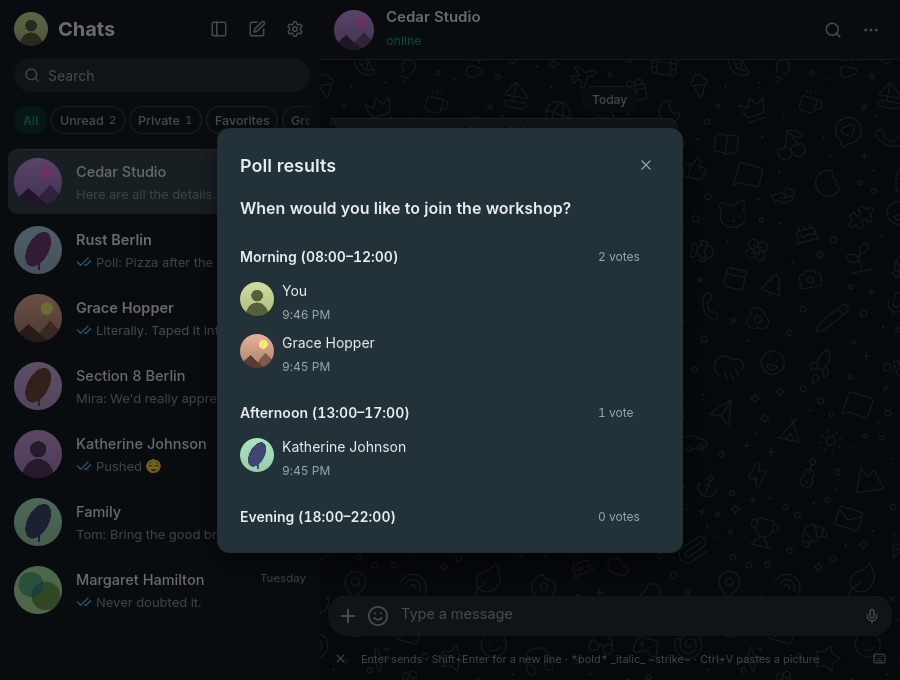
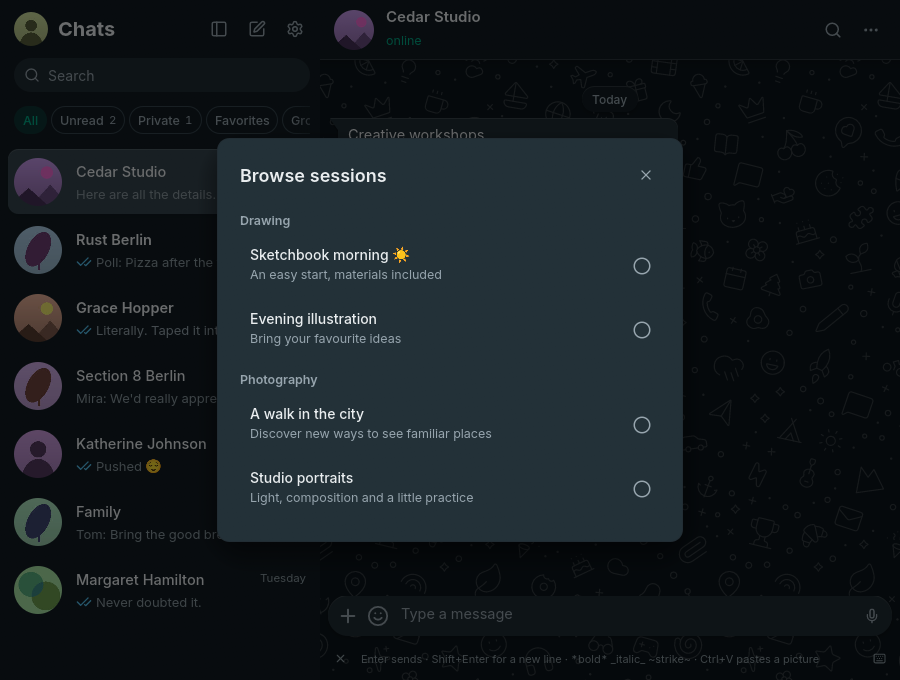
Business templates and button messages show their image above the formatted text, with options in separate rows below the timestamp. Lists open a grouped choice dialog, and carousels show separate image cards in a horizontal strip. You can select the message body, use Copy text to include its option labels, and find these messages through search.
- Web links have an external-link icon. Click one to open it in your browser, or focus it with the keyboard and press Enter.
- Reply buttons send the selected response immediately, quoting the original message. ZapFast includes the option identifier so the business can recognize the choice. Legacy buttons, hydrated templates, and native-flow quick replies are supported.
- Simple lists open a dialog with section headings and descriptions. Select an
item to send it. Legacy single-select lists and native-flow
single_selectmenus are supported. Opening or dismissing the dialog does not send anything. - Copy-code buttons copy the supplied code to your clipboard without sending a message.
- Unavailable options have a phone icon and muted text. Forms, payments, shopping flows, calls, and carousel choices need WhatsApp Web or your phone. Hover over an option to see its explanation. Unsupported or incomplete actions never send a guessed text response.
Replies require a connection and a writable chat, and cannot be sent to your own outgoing cards. During a send, the card waits for its result before accepting another reply. A failed send shows the normal failure status and allows another attempt.
Replies from your other devices appear as ordinary replies, with a quote when the original message is included.
Images follow the same automatic-download setting, size limit, and retry behavior as other photos. Click a downloaded image to open it.
| Dark theme | Light theme |
|---|---|
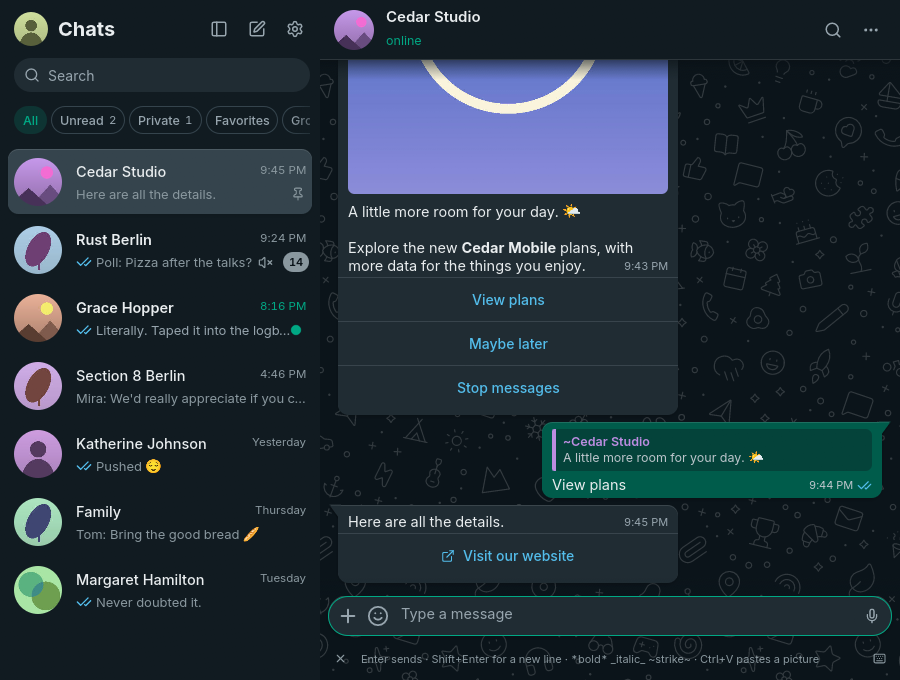 |
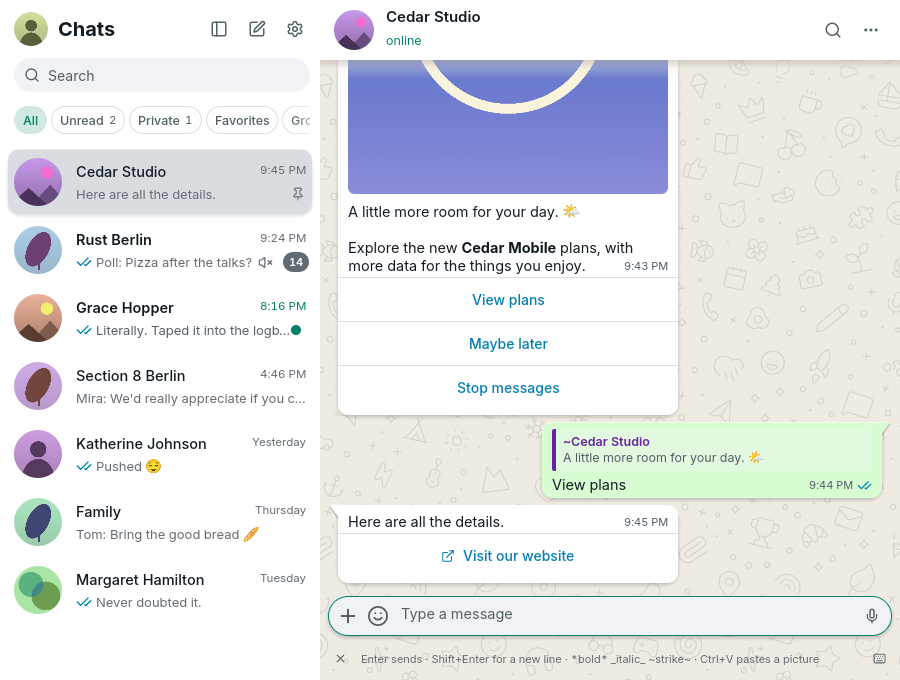 |
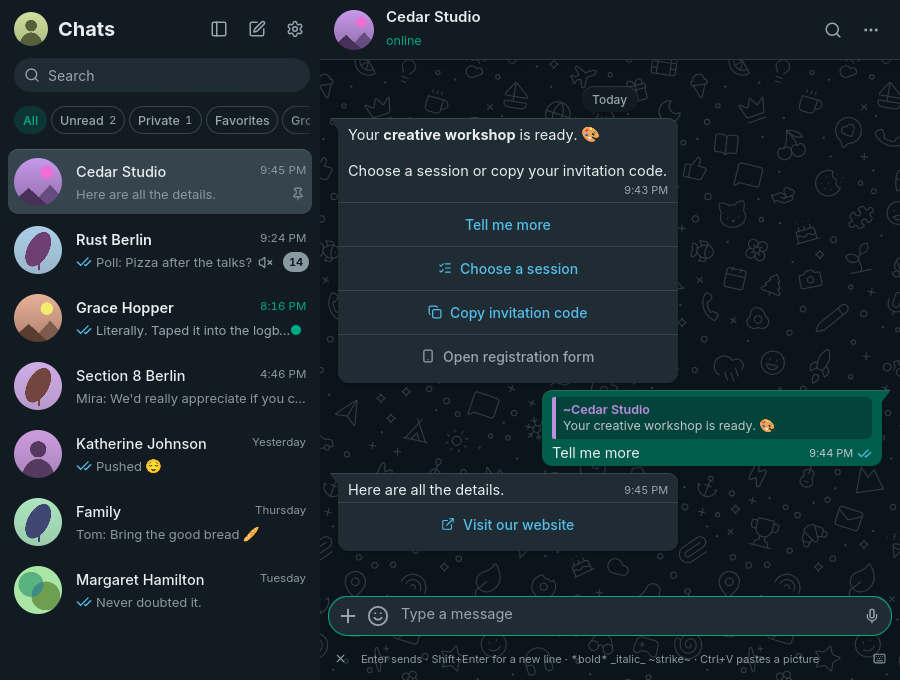
All screenshots use offline demo content.
Previously unsupported messages are recovered automatically from the local archive when their original data is available and they have not been edited. Existing cards gain their supported actions too. You do not need to link again. Edited messages keep their current text, and downloaded images stay available.
Embedded videos, documents, and templates containing only a reference to server-side text still need another client. A More content in WhatsApp Web or on your phone note marks content ZapFast cannot display. Interactive messages cannot yet be forwarded from ZapFast.
Lists, polls, and carousels
Lists open a centered dialog, like Show votes, with the message’s title, sections, option names, and descriptions. Click an option or focus it and press Enter to send that selection. Close the dialog or press Escape to leave without choosing.
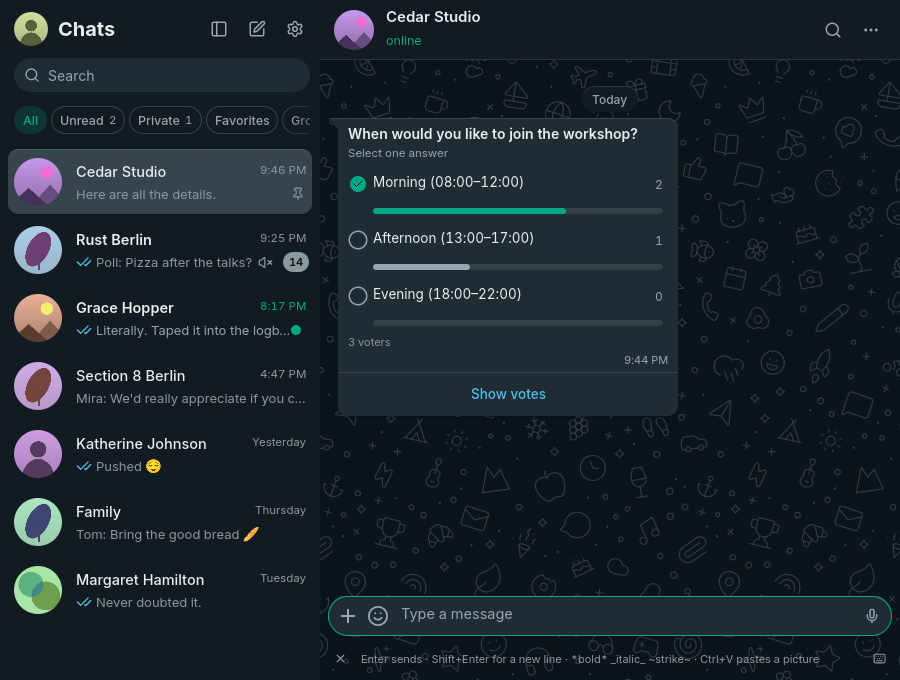
Poll options show a result track even before votes arrive, and your selection has a checkmark. Show votes opens participant names and vote times. If phone history is still arriving, the dialog explains that earlier votes may be missing. New polls received live start at zero without requesting earlier votes. Polls received from history or while offline still recover results from the phone. Polls archived by older builds may also need this recovery because those builds did not retain whether the poll originally arrived live.
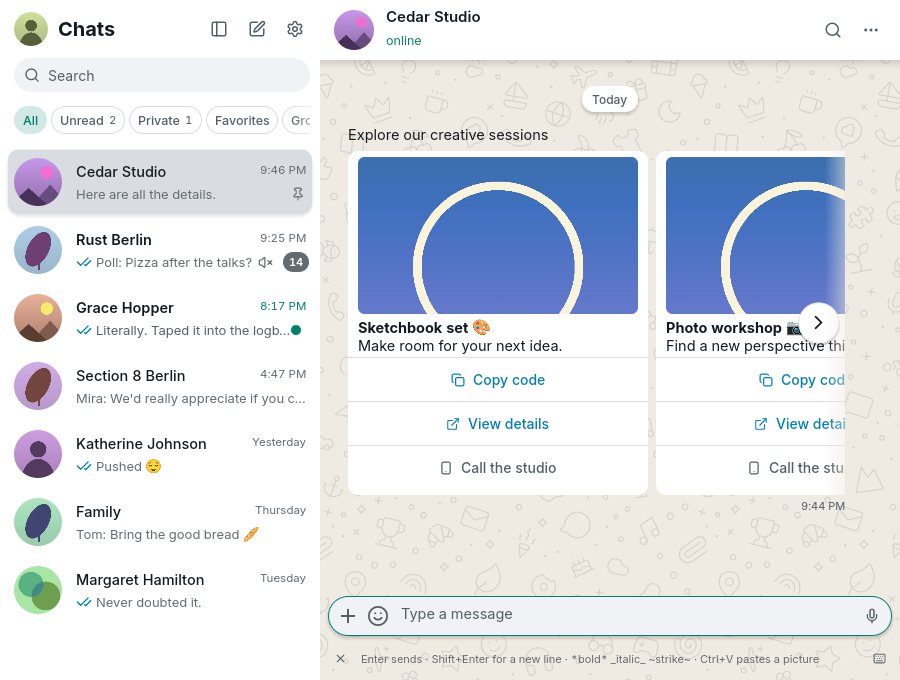
Carousel messages keep each card’s image, text, and actions together. The timestamp sits below the last card when the strip fits. When cards extend beyond the view, round previous/next arrows appear over the strip. Click an arrow or focus it and press Enter to move one card at a time. The arrows disappear at their respective ends; Shift + mouse wheel and horizontal touchpad scrolling remain available over the cards, without a bottom scrollbar. Image downloads follow your automatic-download setting. Web links and copy-code buttons work; calls and unsupported carousel reply actions remain unavailable.
| Carousel cards | Poll result details |
|---|---|
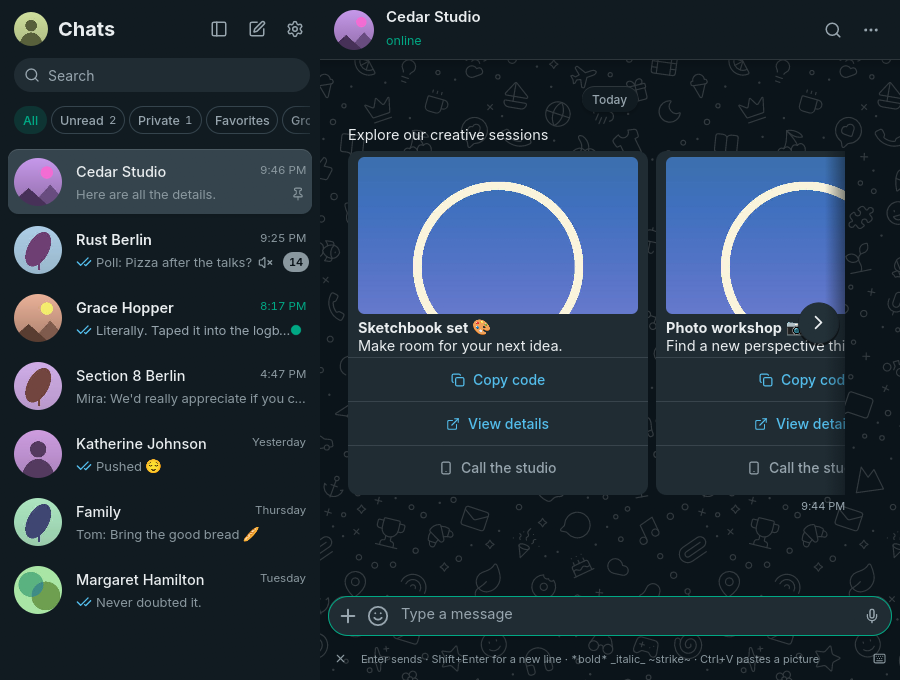 |
 |
| Grouped list dialog | Poll selection and results |
|---|---|
 |
 |
Videos and photos
Click a video to download it to the local cache and play it in its message, with sound, a seek bar, a speed chip, and a mute switch; round video messages play inside their circle. Click the speed chip to cycle 1x, 1.5x, and 2x, as on voice messages: voices keep their pitch, stereo sound stays stereo, and the speed stays for the next video until ZapFast quits. Already downloaded videos play from their local file. Playback waits for the download to finish; videos over the 64 MiB automatic download limit download when you click them. Double-click one, or use the button at the end of its controls, to play it in the full-window viewer: Space plays and pauses, the arrows jump five seconds, M mutes, S changes the speed, and Escape closes the viewer and stops the video. The built-in player supports H.264 video in MP4 files; other formats open in your system player.
Click a downloaded JPEG, PNG, or WebP photo to open it in the full-window viewer, with zoom (wheel, Ctrl+wheel, or a pinch, and a double-click between fitting the window and the original size) and Copy image. Open in the viewer in a photo’s or a video’s menu does the same. The chat’s photos, videos and interactive-card images run along the bottom: click one, press the Left and Right arrow keys, or hover over the picture and click the previous and next arrows at its sides to move between them. The header replies, reacts, forwards, saves or downloads, and shows the message in the chat. A click on the empty space around the picture, or Escape, closes the viewer. It also closes when its chat is removed, becomes locked outside the unlocked folder, or when you close the locked folder. Save as… in a downloaded attachment’s right-click menu keeps a copy wherever you choose.
A motion photo has a play button in its corner. Click it to download the short clip to the local cache and play it over the photo, muted and in a loop; click again to return to the photo. In the viewer, the play button in the header plays the clip over the photo with sound, and the photo button beside it goes back. Clips over 64 MiB are not downloaded.
Polls
Choose Create poll from the plus menu beside the message field to ask a question with 2 to 12 answers; turn off Allow multiple answers for a single choice. Click an answer to vote, and click it again to take the vote back. Creating polls in chats with disappearing messages is not supported yet.
Voice messages
Voice messages play in the chat with a seekable waveform; audio files show a music icon and a seek bar instead. The chip beside the waveform or seek bar cycles the playback speed between 1x, 1.5x, and 2x. Right-click the message for every speed, including 1.25x and 1.75x. The choice is remembered for later messages. To give one chat its own speed, right-click the chat in the list and pick Voice message speed. That chat then always plays at its own speed, and the chip there changes only that chat. Pick Default to follow the speed of the other chats again. When a voice message ends, playback carries on through the voice messages right after it that you have not heard yet, as on the phone; any other message ends the run. The speaker’s pitch stays the same at every speed. The first play sends a played receipt, so your phone marks the voice message as heard. With read receipts off in your account privacy, the receipt goes only to your own devices and the sender is not told. With Send read receipts off in ZapFast’s settings, no played receipt is sent. A voice message you have not heard yet shows a dot beside its length; it goes away once you play it here or on another device. When the composer is empty, the send button becomes a microphone. The light beside the time turns red, and the time starts, once the microphone delivers sound: one the system had put to sleep can take a moment to wake, and anything said before then is not recorded. Press Enter or the send button to send the recording, or Escape or the delete button to discard it. ZapFast raises the volume of quiet recordings. Starting a reply before recording includes the quoted message.
Calls
The phone and camera buttons in a one-to-one chat’s header start a voice or a video call; while that chat has a call, a hang-up button takes their place. The call screen opens as soon as you press the button and says Connecting… while the call is set up, Calling… once it is sent, and Ringing… once the other phone rings, when you also hear a ringback tone. Hanging up before then cancels the call before it reaches them. An incoming call takes over the window with the caller’s picture and name, and Accept and Decline. It also raises a desktop notification and plays a ringtone until it is answered, declined, or given up, so a window hidden in the tray does not hide the call. The ringtone follows your notification sound: with the sound set to None, or notifications off, a call shows without ringing. A call in a muted, archived, or locked chat stays as quiet as a message in it. A locked chat’s call waits in a strip at the bottom of the window as “Locked chat” until you open the locked chats with their code.
During a call the window shows the length of the call, counted from the moment the two sides are connected, and the controls along the bottom: mute, the microphone and speaker pickers, and hang up. Mute tells the other side, as on the phone. The arrow in the top corner puts the call screen aside: the call keeps running in a strip at the bottom of the window with Return to the call and a hang-up button, and you can read and write in any chat meanwhile. Escape does the same, and leaves full screen first. Only hanging up ends a call; closing the window to the tray keeps it running. A call you hang up or decline leaves the screen at once; one the other side ends, declines, or misses, or one that could not connect, says so for a second and a half.
In a video call the other side’s picture fills the window and yours sits in the top corner. The camera button turns your camera off and on; in a voice call it asks the other side to switch to video, and when they ask, the call screen says so and the same button answers. A computer without a camera, or with one another program is using, still takes part in a video call: you see the other side, and your camera stays off.
Your picture follows the connection. A call starts at a moderate quality and rises to 720p at 25 frames a second while the other side reports a clean connection; when it reports loss, or receives much less than ZapFast sends, or the connection cannot keep up, ZapFast sends a smaller picture rather than one that freezes. In a one-to-one call some repair data goes with the picture, so the other side can rebuild a lost packet instead of freezing until the next full picture; it comes out of the same budget, so the call uses no more of your connection.
Calls open the system’s default microphone and speaker, and the first camera. The pickers move a call to another device while it runs without changing your system’s defaults; a device that goes away falls back to the default, and the call screen says so. Cameras come through Video4Linux on Linux, AVFoundation on macOS (which asks once for permission), and Media Foundation on Windows. The Flatpak is allowed its devices for this, since Flatpak has no narrower permission for cameras. Calls use your platform’s own audio (PipeWire, PulseAudio or ALSA on Linux, Core Audio on macOS, WASAPI on Windows). ZapFast cancels echo itself, with the echo canceller browsers use (WebRTC’s), so you can call with speakers and a microphone and the other side does not hear themselves: what the speaker plays is taken back out of what the microphone picks up before it is sent, including the room’s reverberation, which in a bare room with desk speakers is most of the echo. The first moments of a call, or of a new device, may let a little echo through while it learns the room, and while both of you talk at once your voice may come through a little quieter in a very reverberant room. It also turns down steady background noise, such as a fan, and raises a quiet microphone (by at most the same amount voice messages are raised), but it never changes your system’s microphone volume. With headphones there is no echo to take out and your voice goes out as it is; there is nothing to switch.
Group calls
Group calls are experimental. A group’s header has the same call buttons as
a person’s, a call to one of your groups rings here as any call does, and a
call link in a message (call.whatsapp.com/voice/… or /video/…) joins that
call. Everyone hears everyone, and each person’s video gets a tile of its own.
In testing your own video, as the others see it, still stopped for a moment
every few seconds: one-to-one calls rebuild lost video from repair packets,
and group calls do not yet. If WhatsApp has not turned on group calls from a
computer for your account, starting one says so: ask someone in the group to
call it, and answer here.
One call at a time: a call to another of your numbers while one is up is declined there. With several numbers linked, a call to a number that is not on screen still rings, under that number’s own names.
Every call takes its place among the chat’s messages, as on the phone: who called, voice or video, how long it lasted, or that it was missed, declined, or not answered. Calls made here are filed when they end, and so are the phone’s: the ones it reports as they happen, the calls missed while ZapFast was closed, and the call history it sends when the computer is linked. Right-click a call in a chat to call back from there.
Calls in the rail on the left of the chat list (Ctrl+Shift+2, Command
on macOS) opens the Calls tab, laid out as in WhatsApp: the list shows
every call of the number on screen, newest first, with calls in a row from the
same person folded into one row with a count. Each row says which way the call
went (a missed call’s name is red), when, and how it went, and its phone or
camera button calls back the same way. The search field finds calls by name or
number. The chips under it show All calls or only the Missed ones (calls
to you that nobody answered, group calls included); a search looks among the
calls the chip shows, and ZapFast remembers the chip for each number. The chat
you had open stays beside the list; clicking a row opens that
person’s chat there instead, at the call, with the voice and video buttons in
its header. With no chat open, the pane beside the list offers Start call.
The New call button in the list’s header (or Start call) opens a list
of the people you call most often and all your contacts, searchable by name or
number, each with a voice and a video button. Click Chats in the rail,
press Ctrl+Shift+1, or press Escape to go back to the chats. Switching
numbers keeps the Calls tab open on the other number’s calls. In a narrow
window the list takes the whole window beside the rail, and a picked call’s
chat opens over both, with a Back button. Group calls show up in the history
under their group, named by who called; they are started on the phone.
Copying
Select and copy any message text. You can begin dragging in the padding around the text instead of landing precisely on a letter. A selection across messages uses WhatsApp’s sharing format:
[18:21, 8/30/2026] Ada Lovelace: Hello from France!
[18:27, 8/30/2026] You: Sure, I will take a look
To copy whole messages, choose Select from a message’s menu (or
Command-click on macOS, Ctrl-click elsewhere), then select the other messages
you want. Press Cmd+C on macOS or Ctrl+C elsewhere. The clipboard includes
only the selected messages, in chat order, using the same sharing format,
even if some have scrolled off-screen. Attachments contribute a text label and
any caption; their files are not copied. Copying keeps the selection open.
Chats
To message someone without saving their number, open New chat, choose
Add contact, enter the number with its country code, leave the name blank,
and choose Message. A leading +, spaces, hyphens and brackets are fine;
anything else, such as an extension, is refused rather than dropped. ZapFast
asks WhatsApp whether the number is registered before it opens the chat, and
a failed check can be retried. Add a name instead to save the contact.
To make a group, open New chat and choose New group. Each contact gets a check box: search for a name, check the person, and search for the next; the people you pick appear above the list, and clicking one there takes them off again. Choose Next, type the group’s name (WhatsApp allows up to 100 characters), optionally choose Add group photo (cropped to a centred square, as the group details’ photo is), and choose Create. You are the group’s admin, and the new group opens straight away. Some people’s privacy settings only let certain contacts add them to groups: when WhatsApp does not add someone, ZapFast names them after the group is created, and you can send them the group’s invite link from its details. Back steps back, unchecking everyone returns to the contact list, and Escape closes the dialog.
The search bar finds chats by name, number, or latest message; searches all
messages stored on this computer; and finds contacts without an existing chat.
Use ↑/↓ to select a matching chat and Enter to open it ready for typing.
Click a message result to jump to it, or a contact to start a chat. Use
Alt+↑/↓, or Ctrl+Shift+[ and Ctrl+Shift+] as in WhatsApp, to switch chats
without leaving the composer (Command instead of Ctrl on macOS), and
Ctrl+1 through Ctrl+9 to open the chat at that position in the list. Within an open
chat, PgUp/PgDn scroll by about a page, and Home/End (or Ctrl+End)
jump to the top or the newest message when the input is empty. With text in
the input, they move the text cursor as in any editor.
With a mouse that has them, the Back and Forward side buttons step through the places you have visited, as in a browser: between chats, and between the chat list, Settings, and the wallpaper picker. Forward repeats a step until you visit something new. The buttons do nothing while a dialog, menu, or other overlay is open; close it first, with Escape or its own button.
Sending while reading older messages keeps your place. Use the
newest-message button or End to return to the latest message when you are
ready. After you send, the chat moves to the top of the chat list, and the list
follows it there when it was already at or near the top. Scrolled further down,
working through older chats, the list keeps your place.
Under the Favorites chip, the list keeps the phone’s order and stays in place.
While you scroll through a conversation, the day of the first message on screen stays at the top of the transcript, and fades away a moment after you stop.
A shared contact message shows the name from its vCard. When the card names a WhatsApp account, Chat opens a private conversation with it and, if the person is not already in ZapFast’s contacts, Add saves them, adding them to your phone’s contacts if you chose that for the last contact you added. A card with only a local number shows the number.
The contact or group details, opened from the chat header or by right-clicking a chat in the list, show a chat’s disappearing-messages timer, or Off once it has been turned off. Change the timer on your phone; messages you send from ZapFast follow it. Messages you receive stay in ZapFast’s archive after they disappear on your other devices.
The chips under the search bar narrow the list to Unread, Private (one-to-one chats), Favorites (in your phone’s order), or Groups. Followed channels have their own Channels chip. Archived, in the rail on the left above Settings, opens the archived chats in the list, and shows how many of them are unread. A chip with unread chats shows how many it has. Click the active chip again, or All, to see every chat. The filter applies only to this list: search and the archive still show everything. ZapFast remembers the chip or label each account last showed and comes back to it at the next start. As on the phone, the list leaves out people you have never exchanged a message or call with, though your phone sends their chats along with the others. One stays listed while it is pinned, a favorite, labeled, unread, locked, open, or holds an unsent draft. Search still finds them, and the first message or call brings one into the list. When the chips do not fit the chat list’s width, the row fades at its edge: scroll it with the mouse wheel or a touchpad, or drag the scroll bar that appears while the pointer is over the row. The label row scrolls the same way.
Right-click a chat to pin, favorite, archive, mark as unread, or mute it for
eight hours, one week, or indefinitely. These changes also apply on your
phone. Clear chat is in this menu and in the chat header’s menu; it needs a
connection and asks first. It clears messages on this computer and your phone,
removes cached media from this computer, and keeps the chat. Media saved in
your configured download folder stays there. Delete chat in
the same menu also needs a connection and confirmation. Groups and channels
can be left from the same menu, keeping their history here. Ctrl+E
(Command+E on macOS) archives the open chat, or unarchives it from
Archived, as in WhatsApp.
ZapFast follows your phone’s Keep chats archived (in WhatsApp’s chat settings): with it off, a new message, received or sent, brings an archived chat back to the list, as on the phone. Until a phone has sent its setting, Keep chats archived in ZapFast’s Settings decides for that account. Messages older than the archiving, duplicate deliveries, and history replay leave archived chats in place.
The search icon in a chat’s header (Ctrl+F) opens a pane listing that
chat’s matches, newest first. Its calendar narrows them to one day.
Click the chat header, or choose Info in its menu, to open the info panel
beside the chat. It shows the picture, the number or the members, and the
chat’s actions. When WhatsApp lets you edit a group’s info, rename it with the
pencil beside its name and click its photo to change it. Clicking a
chat.whatsapp.com invite link shows the group and joins it without leaving
ZapFast.
The details of a group you run (as one of its admins) also let you manage it, as WhatsApp’s own apps do:
- Invite via link shows the group’s
https://chat.whatsapp.com/link. Copy link puts it on the clipboard to paste wherever you like, for example to gather friends for a call. Reset link asks first, then turns the old link off and makes a new one: anyone holding the old link can no longer join with it. Anyone with the link can join, so share it only with people you would add yourself. - Add members opens the same list as New group, without the people already in it: check the ones to add and choose Add. When someone’s privacy settings do not let you add them, or they left the group recently, ZapFast names them; send them the invite link instead.
- Group permissions has WhatsApp’s switches: whether members (not only admins) may edit the group’s settings, send messages and add other members, and whether admins approve new members before they join. A switch moves once WhatsApp accepts the change. Requests to join wait on your phone.
- Each member’s row has a … menu (also on right-click): Make group admin, Dismiss as admin, and Remove from group, which asks first. Admins are tagged Group admin. The group’s creator cannot be dismissed or removed.
Members who are not admins see Add members and Invite via link only when the group lets every member add people or share its link. ZapFast keeps the link only while the details are open, never on disk.
Media, links and docs in the panel lists the photos and videos, the documents, and the links shared in the chat, newest first: click a photo or a document to go to its message, or a link to open it in the browser. Press Escape to go back to the overview, and again to close the panel. Drag its edge to change its width. The conversation narrows beside the panel, and when the window is too tight for the chat list as well, the list steps aside until the panel closes. In a narrow window the panel is a page of its own: Back returns to the chat. A locked chat’s media is listed only while the locked folder is open.
Development builds also show a group’s description in the panel. You can select and copy its text, and a long description scrolls. To change the description, use your phone.
Links
A phone number in a message is a link: clicking it offers to start a chat with that number or to copy the number as it is written.
ZapFast registers the whatsapp: and wa: schemes, so a link that names a
chat opens that chat here. This works from a terminal, a script, or anything
else that hands a link to the desktop.
xdg-open 'whatsapp://send?phone=20123456789'
zapfast 'https://wa.me/20123456789?text=Invoice%20%23123%20is%20attached'
zapfast +20123456789
zapfast 'https://chat.whatsapp.com/AbCdEf1234567890XyZ'
A number on its own, a wa.me or api.whatsapp.com link, and the
whatsapp://send?phone= URI all name the same chat. A text= template, which
most shared links carry, lands in the composer without being sent, so you can
edit it or add to it before sending. The composer keeps whatever you were
already typing, and a chat with unsent text of your own keeps it: a template
never replaces a draft you wrote.
A chat.whatsapp.com group invite link given to zapfast shows the same
invite as clicking it in a message: the group is looked up, and you choose
whether to join.
When ZapFast is already running the link brings its window forward on that chat rather than starting a second copy, and when it is not it starts and opens the chat. A running copy of an older ZapFast that cannot open the link only brings its window forward, and the command says so: quit it and run the command again. While the app lock is up links wait for the unlock rather than opening anything the lock hides, and then open in the order they arrived.
A https://wa.me/... link opened in a browser still opens WhatsApp Web: the
desktop decides what a web link means, and a browser cannot be told to hand
one link to another app. Use the whatsapp: form, or zapfast, for that.
An unreadable argument opens nothing and says so, rather than opening a chat it guessed at.
Locked chats
Lock chat in a chat’s right-click menu moves it into a locked folder: it leaves the chat list, search, and the unread count, and never raises a notification. The lock syncs with your phone and other linked devices.
Choose Locked in the rail on the left, above Settings, and type your local code to open them; the first time, ZapFast offers to set one up. The code is separate from your phone’s and adds no encryption beyond the encrypted message archive. Leaving the tab, changing the code, or closing the window hides them again.
Labels
Labels are yours alone. They stay on this computer, they never reach your phone, and nobody else sees them. They are not WhatsApp Business labels, and ZapFast does not read or change those. Open Labels in any chat’s right-click menu and choose Manage labels… to make one, with a name and one of the offered colours. ZapFast keeps up to twenty.
A chat can wear several labels at once. The Labels submenu of a chat’s right-click menu lists them, with a checkmark beside the ones the chat wears; click one to add or remove it. Deleting a label takes it off every chat and nothing else; the chats keep their messages.
Once a label exists, a row of label chips appears under the other chips, one per label, with its colour and the number of unread chats wearing it, followed by a + that opens the label manager. Pick a label to list only the chats wearing it, channels included. A label is one more chip: picking it lets go of Unread or Groups, and picking one of those lets go of the label. Like the other chips, it does not narrow search or the archive. Click the active label chip again, or All, to see every chat.
A thin rail runs down the left of the chat list: Chats and Calls
(Ctrl+Shift+1 and Ctrl+Shift+2, Command on macOS) at the top;
Starred, Archived and Locked (while you have archived or locked
chats), Settings, and your own picture (the account switcher) at the
bottom. The one on screen is lit. The chat list’s header keeps its title, New
chat, and the button beside it (Ctrl+B), which hides the list: the chats’
avatars then fill the rail between its top and bottom buttons. Unread chats
show their badge, hovering names a chat, clicking opens it, and Ctrl+B or
the button under Calls brings the full list back.
In a short window, scroll the rail to reach its lower buttons. Tab and
Shift+Tab bring the focused button into view, too.
Notifications and the tray
Closing the window keeps ZapFast linked in the tray. On macOS, click the menu
bar icon to open its menu, then choose Show or hide ZapFast to reopen the
window. On Linux and Windows, click the tray icon to reopen it. Launching the
app again reopens the window on every platform. To quit, use Quit in the
tray menu, or Quit in the Dock icon’s menu on macOS, or on Linux Quit ZapFast in the
launcher’s right-click menu (KDE Plasma’s task manager and application menu,
GNOME’s Dash). On every platform, zapfast quit in a terminal or a script quits
the running copy the same way, and does nothing when none runs. A copy from
before this command is left running, and the command says so and fails.
Launchers that support the Unity Launcher API
show the unread count as a badge on the app icon: KDE Plasma’s taskbar, with
Show badges enabled in the Task Manager settings, and GNOME’s Dash to Dock
or Dash to Panel. Windows overlays a compact unread-message count on ZapFast’s
taskbar button while the window is open, using 99+ above 99. Windows must use
its regular taskbar icon size for overlays to appear. The count
does not count toasts remaining in Windows notification history. On macOS, the
Dock icon shows the number of unread chats in a red badge. The icon and
badge stay with the app when its window is closed and reopened. A macOS
source build run through Cargo uses ZapFast’s icon too. Starting hidden
lets you open the first window from the menu-bar menu. On Linux and
Windows, notifications show the chat picture. On Linux, Windows, and macOS, a
click on a notification opens the chat at the message it announced. This holds for the 32 most recent tracked notifications on all three platforms;
older notifications remain in system history without a message click listener.
Reading a chat removes its tracked notifications, including Windows toasts.
On Windows, while every display is off, ZapFast leaves new-message notifications
to the phone instead of queuing desktop banners to appear when the display turns on.
Fastframe provides the same delivery and cancellation interface on each platform. macOS
asks once for permission to show notifications. On Linux, a notification that arrives while the
window is open behind others also highlights ZapFast in the taskbar until you
switch to it. GNOME and Hyprland get no highlight: GNOME would show a second
notice, and Hyprland can bring the window to the front instead. Muted chats do not send notifications, and
archived chats stay quiet while they remain archived. You can change both settings.
With several numbers linked, the bell beside a number in the account switcher
mutes all of that number’s notifications while it stays connected, and leaves
its unread chats out of the app icon’s badge, as a muted chat’s are.
To keep messages off the screen, turn off Show message content in
notifications in Settings: notifications then say only “New message”.
To hear less from busy chats, set Limit repeat notifications in
Settings > Notifications to direct messages, groups, or both: a chat then
sends one notification, then stays quiet for 10 minutes or until you read it,
here or on another device. In a group, a mention of you or a reply to you always notifies.
Press Ctrl+/ or click the keyboard button under the composer to list all
shortcuts.
Screen readers
ZapFast announces confirmations, errors, connection changes and history loading through the screen reader without moving focus. While the app is locked, only connection and history changes are announced.
Each message, or album, is exposed as one item that reads its sender, text, time and delivery status, then any quote, forward, edit and reactions; the first message of a day starts with the day and the first unread one with Unread.
The messages form one list, named for the chat, such as “Messages with Ada” or “Messages in Rust Berlin”, and each message, or album, reports its position in it. The list is a single Tab stop: Alt+2 (Control+2 on macOS) also moves there. In the list, Up and Down move one item, Home and End go to the oldest loaded and the newest message, and PgUp and PgDn move about a screen; Home on the oldest loaded message loads older history. The current message stays put when new messages arrive, and follows when ZapFast itself takes you to a message: the next voice message playing on, a quoted message, or a search result. After keyboard navigation it is outlined like any other focused control.
Shift+F10 opens the current message’s menu with focus on its first item; Tab, Shift+Tab, Up and Down move through the menu, and Escape closes it and returns to the list. The Applications key does not work yet: egui does not report it. In this menu, as in any other, typing a letter moves to the next item whose name starts with it without choosing it, and the same letter again moves on. Opened from the keyboard, the menu also lists a card’s buttons, so none of them needs the pointer, and what is about the message rather than in it: going to the replied message and the sender’s info in a group. The right-click menu is unchanged. In the list, R replies to the current message and moves to the message input, E reacts to it, C copies its text (or a downloaded picture), F forwards it, G goes to the message it replies to, Delete (on a Mac, Delete or Fn+Delete) asks to delete it for you, and Shift+Delete asks to delete it for everyone, with the same dialog as the menu, when that is allowed; otherwise it says why. These keys wait while the chat selects messages. A call in the chat has only a menu to call back, which Space and Enter open too.
In the chat view, Tab moves through the message input and its buttons, phone numbers in messages, chat search, the chat info panel, the message list, the rail, the chat list’s header, search and the chat filters, then returns to the input. Shift+Tab goes back; hidden controls are skipped. Single messages, reactions and chat rows are not stops. The React and Reply buttons that appear beside a hovered message are for the pointer only; keyboard and screen-reader users reach both from the message menu. Alt+Up/Down switches conversations.